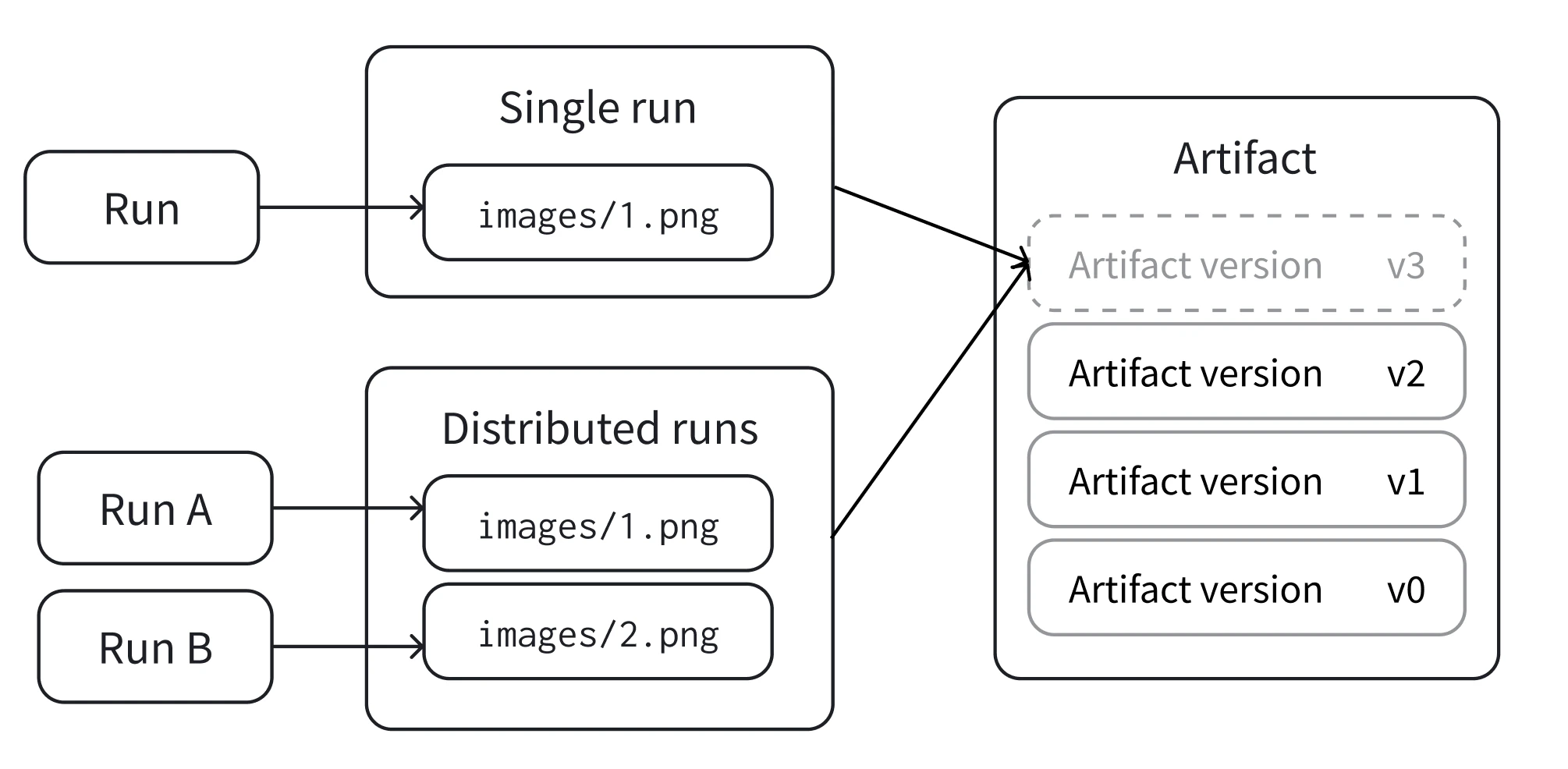
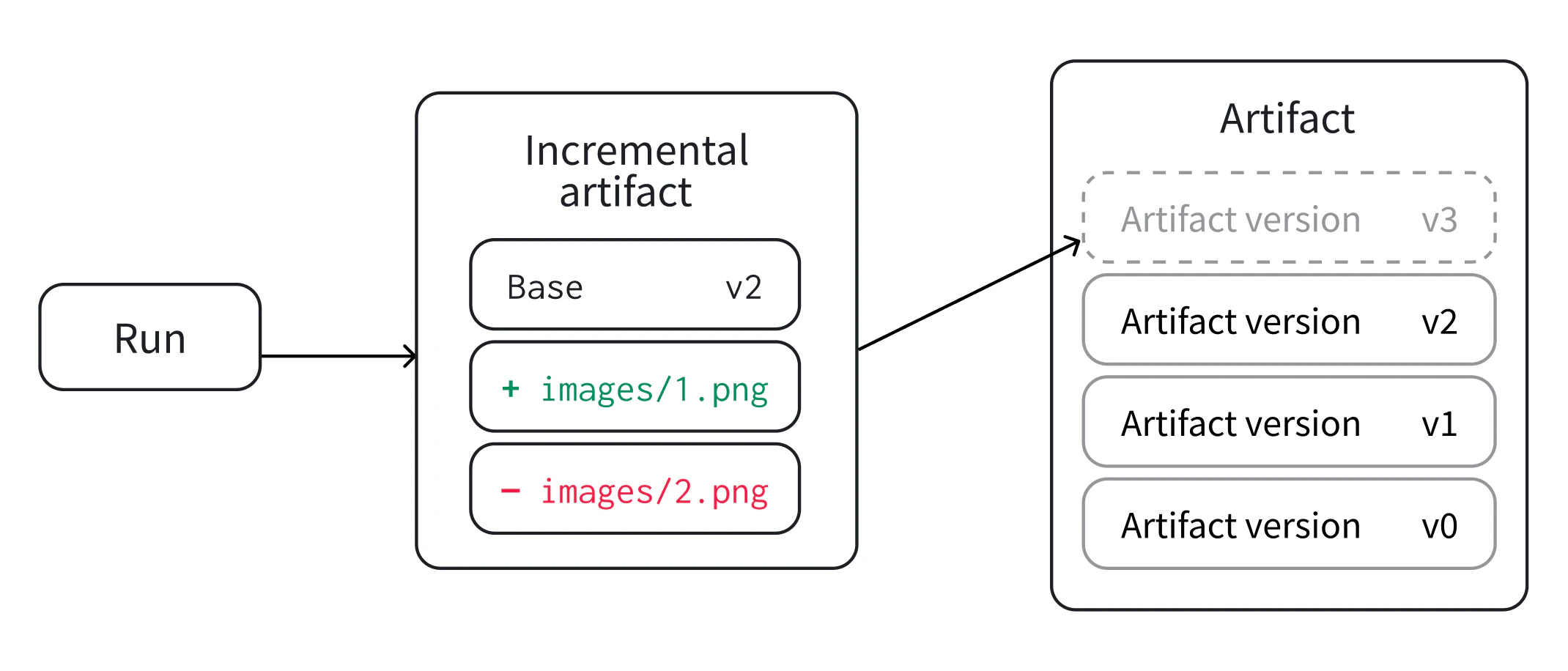
単一の run から、または分散 run と連携して、新しい artifact バージョンを作成できます。必要に応じて、段階的 artifact と呼ばれる既存のバージョンから新しい artifact バージョンを作成することもできます。
artifact 内の一部のファイルに変更を適用する必要があり、元の artifact のサイズが大幅に大きい場合は、段階的 artifact を作成することをおすすめします。
新しいartifactバージョンを最初から作成する
- Single run: 1 つの run が、新しいバージョンに必要なデータをすべて提供します。これは最も一般的なケースで、run が必要なデータを完全に再現する場合に最適です。たとえば、保存済みモデルを出力したり、分析用にモデルの予測を表として出力したりする場合です。
- Distributed runs: 複数の run の集合が、まとめて新しいバージョンに必要なデータをすべて提供します。これは、複数の run が多くの場合並列でデータを生成する分散ジョブに最適です。たとえば、分散方式でモデルを評価し、予測を出力する場合です。
wandb.Artifact API にプロジェクト内に存在しない名を渡すと、W&B は新しいartifactを作成し、v0 alias を割り当てます。同じartifactに対して再度ログすると、W&B は内容のチェックサムを計算します。artifactが変更されていた場合、W&B は新しいバージョン v1 を保存します。
wandb.Artifact API に、プロジェクト内の既存のartifactに一致する名と artifact type を渡すと、W&B は既存のartifactを取得します。取得されたartifactのバージョンは 1 より大きくなります。
アーティファクト 内のすべてのファイルを生成する 1 つの run で、Artifact の新しいバージョンをログします。これは、1 つの run が アーティファクト 内のすべてのファイルを生成する場合に該当します。
ユースケースに応じて、以下のタブから 1 つ選択し、run の内側または外側で新しい アーティファクト バージョンを作成します。
W&B run 内で アーティファクト バージョンを作成します。
wandb.init() で run を作成します。wandb.Artifact を使用して、新しい アーティファクト を作成するか既存の アーティファクト を取得します。.add_file で アーティファクト にファイルを追加します。.log_artifact で アーティファクト を run にログします。
with wandb.init() as run:
    artifact = wandb.Artifact("artifact_name", "artifact_type")

    # `.add`、`.add_file`、`.add_dir`、`.add_reference` を使用して
    # artifact にファイルとアセットを追加
    artifact.add_file("image1.png")
    run.log_artifact(artifact)
W&B run の外で アーティファクト バージョンを作成します。
wanb.Artifact を使用して、新しい アーティファクト を作成するか既存の アーティファクト を取得します。.add_file で アーティファクト にファイルを追加します。.save で アーティファクト を保存します。
artifact = wandb.Artifact("artifact_name", "artifact_type")
# `.add`、`.add_file`、`.add_dir`、`.add_reference` を使用して
# artifact にファイルとアセットを追加
artifact.add_file("image1.png")
artifact.save()
- collection 内の各 run は、同じバージョンで共同作業するために、同じ一意の ID (
distributed_id) を認識している必要があります。デフォルトでは、存在する場合、W&B は wandb.init(group=GROUP) で設定した run の group を distributed_id として使用します。
- バージョンを「コミット」し、その状態を永続的に固定する最後の run が必要です。
- 共同の artifact への追加には
upsert_artifact を使用し、コミットを確定するには finish_artifact を使用します。
upsert_artifact を使って同じ artifact にそれぞれ異なる画像ファイルを追加します。
with wandb.init() as run:
    artifact = wandb.Artifact("artifact_name", "artifact_type")
    # `.add`、`.add_file`、`.add_dir`、`.add_reference` を使用して
    # アーティファクト にファイルとアセットを追加
    artifact.add_file("image1.png")
    run.upsert_artifact(artifact, distributed_id="my_dist_artifact")
with wandb.init() as run:
    artifact = wandb.Artifact("artifact_name", "artifact_type")
    # `.add`、`.add_file`、`.add_dir`、`.add_reference` を使用して
    # アーティファクト にファイルとアセットを追加
    artifact.add_file("image2.png")
    run.upsert_artifact(artifact, distributed_id="my_dist_artifact")
wandb.Run.finish_artifact() を呼び出す run では、アーティファクト にファイルを含めることもできますが、必須ではありません。
with wandb.init() as run:
    artifact = wandb.Artifact("artifact_name", "artifact_type")
    # `.add`、`.add_file`、`.add_dir`、`.add_reference` を使用して
    # artifact にファイルとアセットを追加
    artifact.add_file("image3.png")
    run.finish_artifact(artifact, distributed_id="my_dist_artifact")
Create a new artifact version from an existing version
- add: you periodically add a new subset of files to a dataset after collecting a new batch.
- remove: you discovered several duplicate files and want to remove them from your artifact.
- update: you corrected annotations for a subset of files and want to replace the old files with the correct ones.
You could create an artifact from scratch to perform the same function as an incremental artifact. However, when you create an artifact from scratch, you will need to have all the contents of your artifact on your local disk. When making an incremental change, you can add, remove, or modify a single file without changing the files from a previous artifact version.
You can create an incremental artifact within a single run or with a set of runs (distributed mode).
- Obtain the artifact version you want to perform an incremental change on:
Inside a run
Outside of a run
saved_artifact = run.use_artifact("my_artifact:latest")
client = wandb.Api()
saved_artifact = client.artifact("my_artifact:latest")
- Create a draft with:
draft_artifact = saved_artifact.new_draft()
- Perform any incremental changes you want to see in the next version. You can either add, remove, or modify an existing entry.
Select one of the tabs for an example on how to perform each of these changes:
Add a file to an existing artifact version with the add_file method:draft_artifact.add_file("file_to_add.txt")
You can also add multiple files by adding a directory with the add_dir method.
Remove a file from an existing artifact version with the remove method:draft_artifact.remove("file_to_remove.txt")
You can also remove multiple files with the remove method by passing in a directory path.
Modify or replace contents by removing the old contents from the draft and adding the new contents back in:draft_artifact.remove("modified_file.txt")
draft_artifact.add_file("modified_file.txt")
- Lastly, log or save your changes. The following tabs show you how to save your changes inside and outside of a W&B run. Select the tab that is appropriate for your use case:
Inside a run
Outside of a run
run.log_artifact(draft_artifact)
Inside a run
Outside of a run
with wandb.init(job_type="modify dataset") as run:
    saved_artifact = run.use_artifact(
        "my_artifact:latest"
    )  # アーティファクトを取得して run に入力する
    draft_artifact = saved_artifact.new_draft()  # ドラフトバージョンを作成する

    # ドラフトバージョン内のファイルの一部を変更する
    draft_artifact.add_file("file_to_add.txt")
    draft_artifact.remove("dir_to_remove/")
    run.log_artifact(
        draft_artifact
    )  # 変更をログして新しいバージョンを作成し、run の出力としてマークする
client = wandb.Api()
saved_artifact = client.artifact("my_artifact:latest")  # アーティファクトを読み込む
draft_artifact = saved_artifact.new_draft()  # ドラフトバージョンを作成する

# modify a subset of files in the draft version
draft_artifact.remove("deleted_file.txt")
draft_artifact.add_file("modified_file.txt")
draft_artifact.save()  # commit changes to the draft