메인 콘텐츠로 건너뛰기
LLM 기반 애플리케이션에는 모니터링이 중요한 여러 LLM call, 추가적인 데이터 처리, 그리고 검증 로직이 포함될 수 있습니다. 이러한 중첩 함수와 그 부모-자식 관계는 Python에서는 @weave.op() 데코레이터를 사용하고, TypeScript에서는 weave.op()로 감싸서 Weave에서 추적할 수 있습니다. 애플리케이션의 전체 실행 흐름을 포착할 수 있도록 함수와 하위 함수를 가능한 한 세분화해 데코레이션하는 것을 권장합니다. 이렇게 하면 애플리케이션의 동작을 더 잘 이해하고 원하는 방식으로 조정하는 데 도움이 됩니다. 다음 코드는 퀵스타트 예제를 바탕으로, LLM이 반환한 항목 수를 세고 이를 더 상위 수준의 함수로 감싸는 로직을 추가합니다. 또한 이 예제에서는 weave.op()를 사용해 모든 함수와 그 call 순서, 그리고 부모-자식 관계를 트레이스합니다:
import weave
import json
from openai import OpenAI

client = OpenAI()

@weave.op()
def extract_dinos(sentence: str) -> dict:
    response = client.chat.completions.create(
        model="gpt-4o",
        messages=[
            {
                "role": "system",
                "content": """Extract any dinosaur `name`, their `common_name`, \
names and whether its `diet` is a herbivore or carnivore, in JSON format."""
            },
            {
                "role": "user",
                "content": sentence
            }
            ],
            response_format={ "type": "json_object" }
        )
    return response.choices[0].message.content

@weave.op()
def count_dinos(dino_data: dict) -> int:
    # 반환된 목록의 항목 수를 센다
    k = list(dino_data.keys())[0]
    return len(dino_data[k])

@weave.op()
def dino_tracker(sentence: str) -> dict:
    # LLM을 사용해 공룡을 추출한다
    dino_data = extract_dinos(sentence)

    # 반환된 공룡 수를 센다
    dino_data = json.loads(dino_data)
    n_dinos = count_dinos(dino_data)
    return {"n_dinosaurs": n_dinos, "dinosaurs": dino_data}

weave.init('jurassic-park')

sentence = """I watched as a Tyrannosaurus rex (T. rex) chased after a Triceratops (Trike), \
both carnivore and herbivore locked in an ancient dance. Meanwhile, a gentle giant \
Brachiosaurus (Brachi) calmly munched on treetops, blissfully unaware of the chaos below."""

result = dino_tracker(sentence)
print(result)
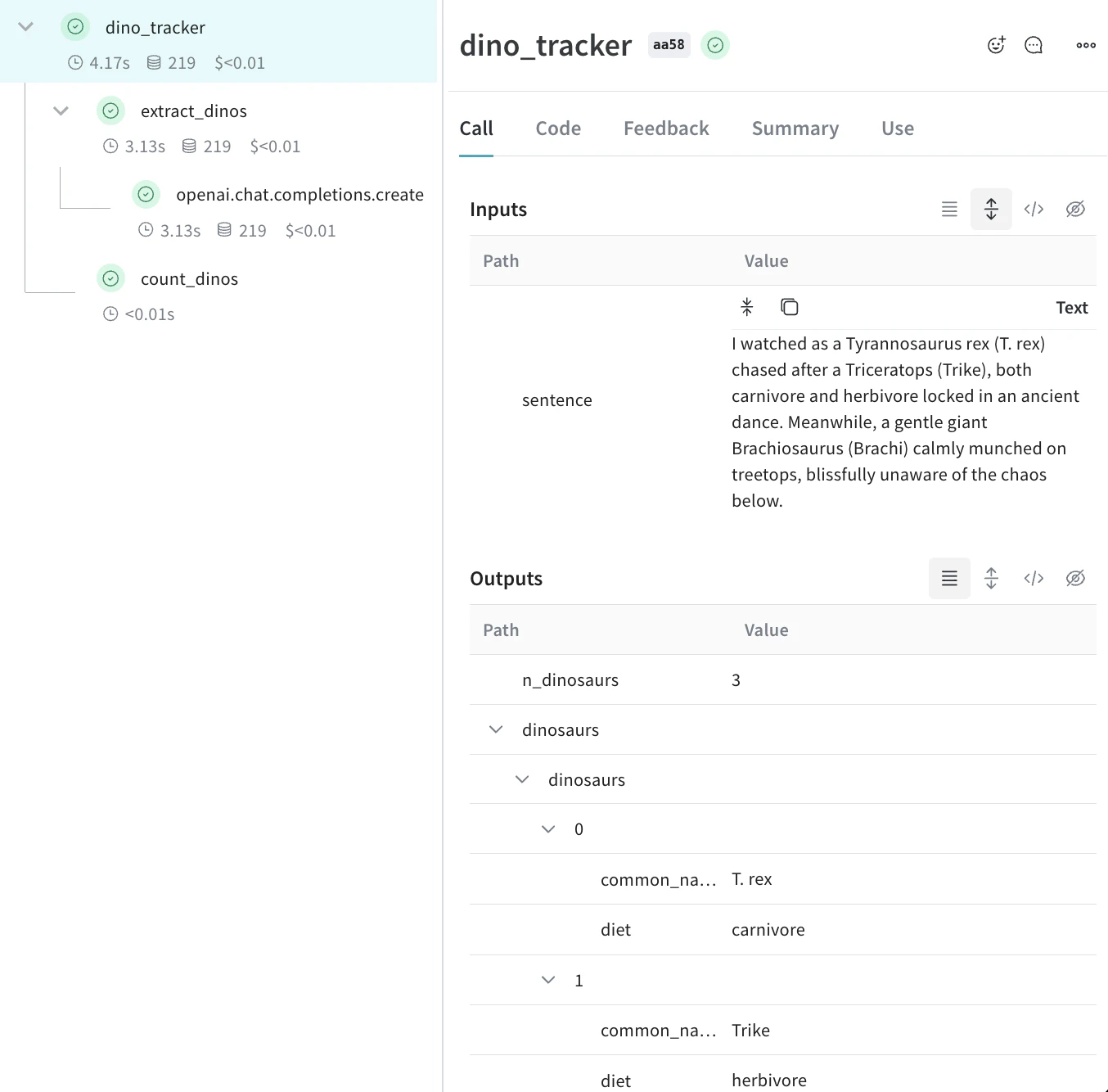
중첩 함수앞의 코드를 실행하면 Traces 페이지에 중첩된 두 함수(extract_dinoscount_dinos)의 입력과 출력이 표시되고, 자동으로 로깅된 OpenAI 트레이스도 함께 표시됩니다.가운데 트레이스 트리 패널과 선택한 Call의 세부 정보 패널이 표시된 중첩 Weave Traces 페이지
메타데이터 추적

weave.attributes 컨텍스트 관리자를 사용해, 호출 시점에 추적할 메타데이터를 딕셔너리로 전달하면 메타데이터를 추적할 수 있습니다. 앞선 예제를 이어서 보겠습니다:
import weave

weave.init('jurassic-park')

sentence = """I watched as a Tyrannosaurus rex (T. rex) chased after a Triceratops (Trike), \
both carnivore and herbivore locked in an ancient dance. Meanwhile, a gentle giant \
Brachiosaurus (Brachi) calmly munched on treetops, blissfully unaware of the chaos below."""

# 이전에 정의한 함수와 함께 메타데이터 추적
with weave.attributes({'user_id': 'lukas', 'env': 'production'}):
    result = dino_tracker(sentence)
사용자 ID나 코드의 환경 상태(개발, 스테이징, 프로덕션)와 같은 메타데이터는 실행 시점에 추적하는 것을 권장합니다.시스템 프롬프트와 같은 시스템 설정을 추적하려면 Weave Models를 사용하세요.
속성 사용에 대한 자세한 내용은 속성 정의 및 로그 기록을 참조하세요.

다음 단계

  • App Versioning 튜토리얼을 따라 임시 프롬프트, 모델, 애플리케이션의 변경 사항을 캡처하고 버전 관리하며 정리해 보세요.